# clanker-teams 🚀
**clanker-teams** turns your single clanker agent into a coordinated software engineering team. It allows you to spawn multiple "Teammate" agents in separate terminal panes that work autonomously, communicate with each other, and manage a shared task board-all mediated through tmux, Zellij, iTerm2, or WezTerm.
### 🖥️ clanker-teams in Action
| iTerm2 | tmux | Zellij |
| :----------------------------------------------------------------------------------: | :----------------------------------------------------------------------------: | :----------------------------------------------------------------------------------: |
| 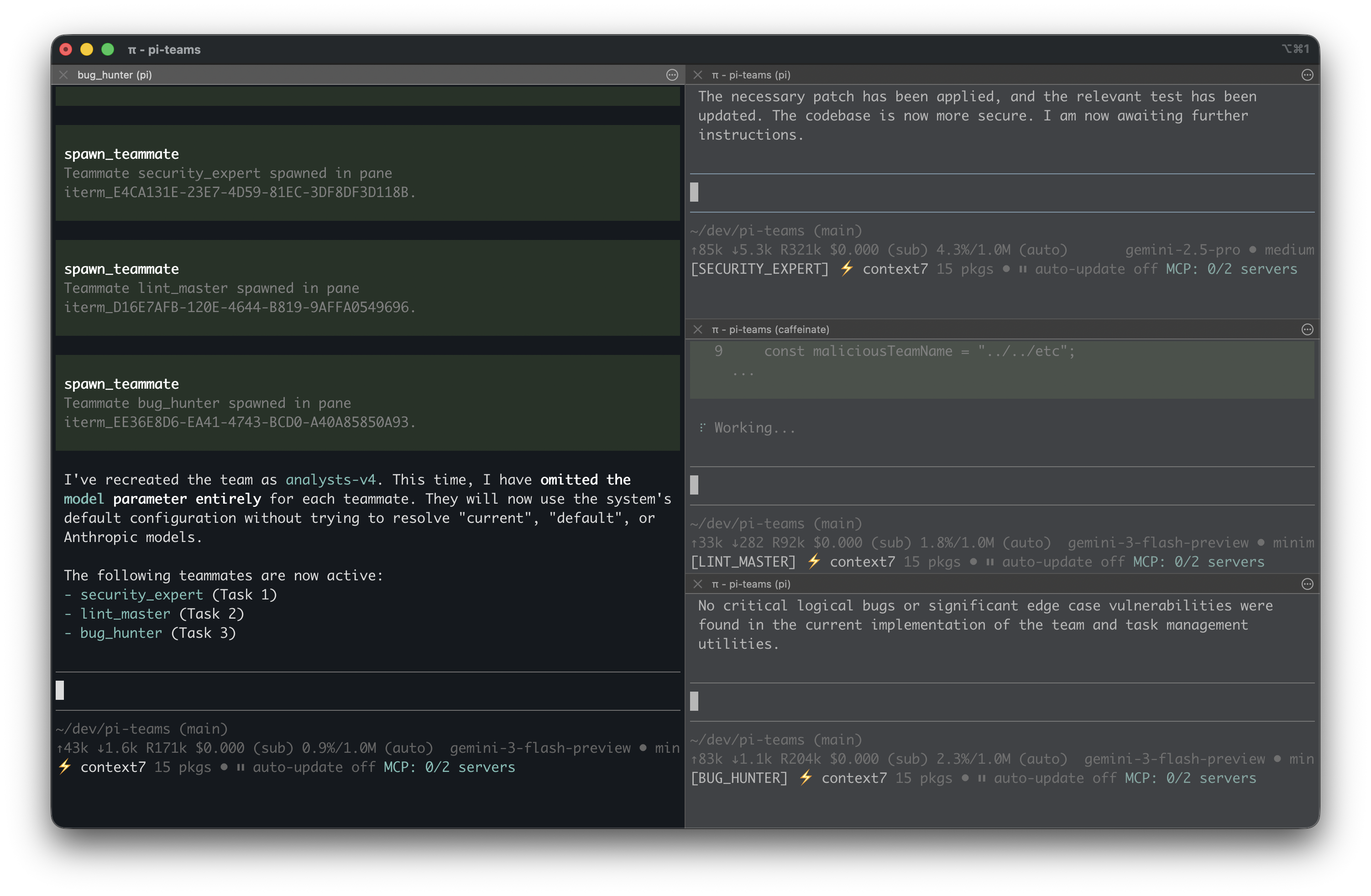 |
| 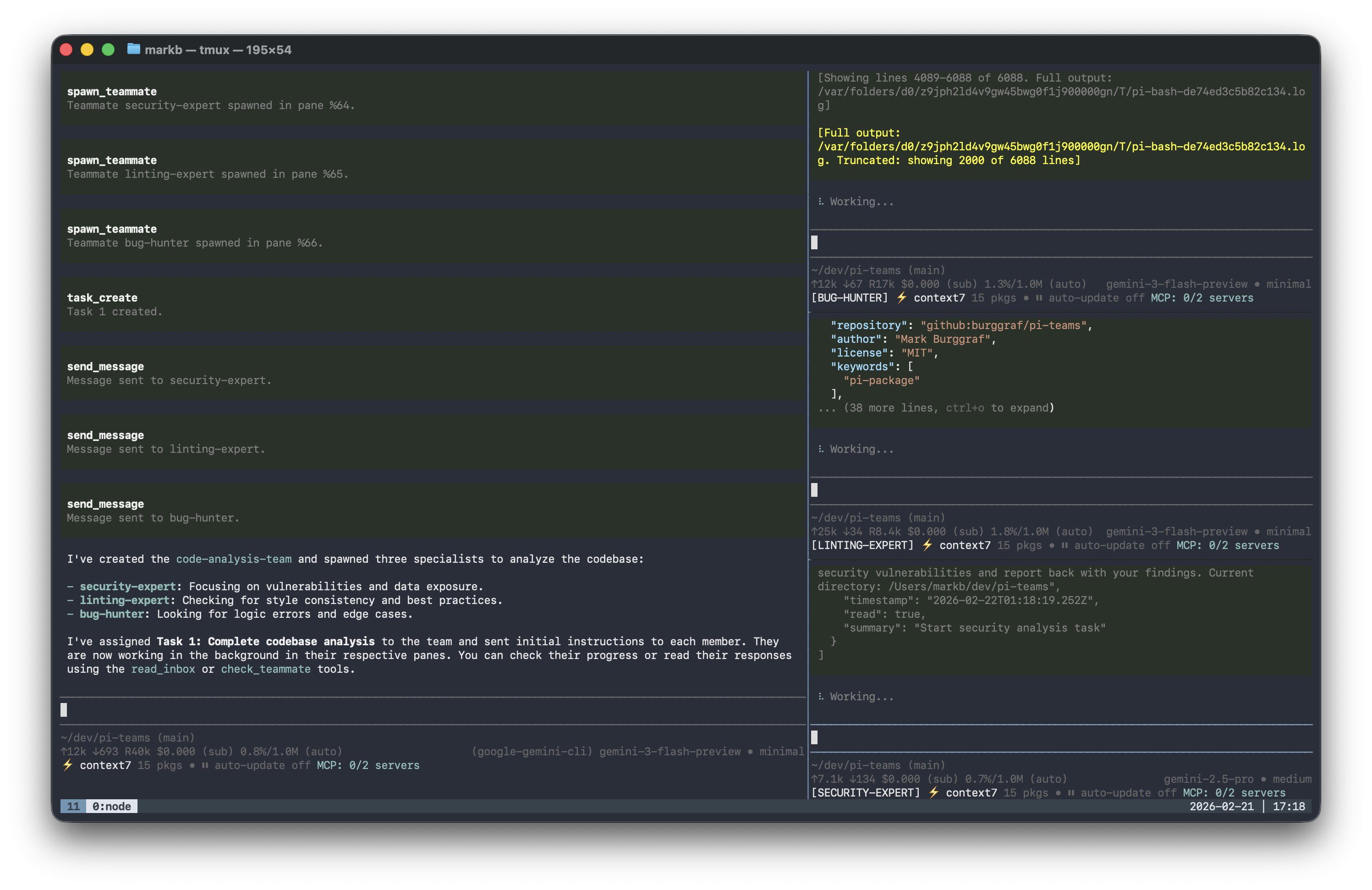 |
| 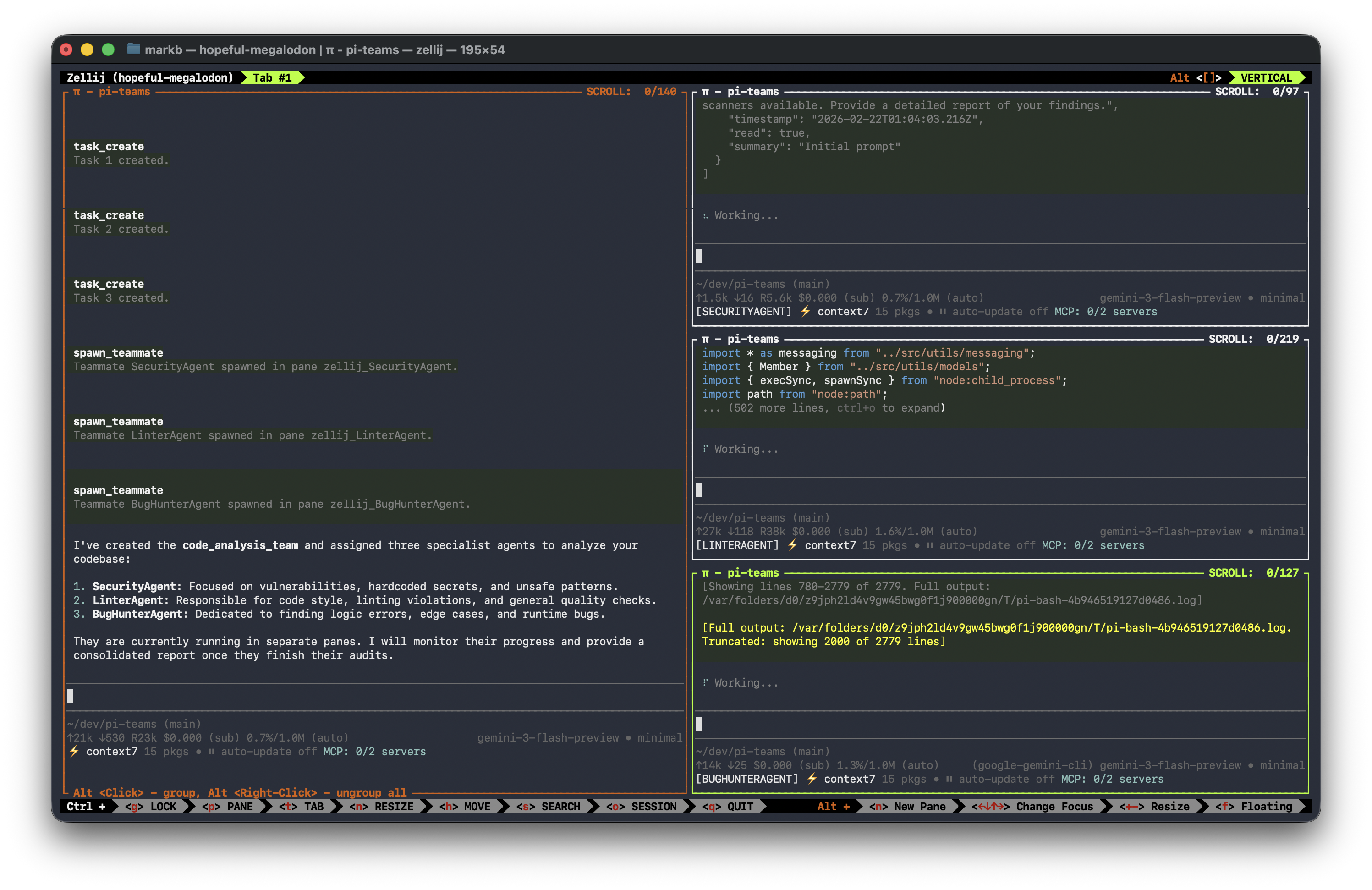 |
_Also works with **WezTerm** (cross-platform support)_
## 🛠 Installation
Open your clanker terminal and type:
```bash
clanker install npm:clanker-teams
```
## 🚀 Quick Start
```bash
# 1. Start a team (inside tmux, Zellij, or iTerm2)
"Create a team named 'my-team' using 'gpt-4o'"
# 2. Spawn teammates
"Spawn 'security-bot' to scan for vulnerabilities"
"Spawn 'frontend-dev' using 'haiku' for quick iterations"
# 3. Create and assign tasks
"Create a task for security-bot: 'Audit auth endpoints'"
# 4. Review and approve work
"List all tasks and approve any pending plans"
```
## 🌟 What can it do?
### Core Features
- **Spawn Specialists**: Create agents like "Security Expert" or "Frontend Pro" to handle sub-tasks in parallel.
- **Shared Task Board**: Keep everyone on the same page with a persistent list of tasks and their status.
- **Agent Messaging**: Agents can send direct messages to each other and to you (the Team Lead) to report progress.
- **Autonomous Work**: Teammates automatically "wake up," read their instructions, and poll their inboxes for new work while idle.
- **Beautiful UI**: Optimized vertical splits in `tmux` with clear labels so you always know who is doing what.
### Advanced Features
- **Isolated OS Windows**: Launch teammates in true separate OS windows instead of panes.
- **Persistent Window Titles**: Windows are automatically titled `[team-name]: [agent-name]` for easy identification in your window manager.
- **Plan Approval Mode**: Require teammates to submit their implementation plans for your approval before they touch any code.
- **Broadcast Messaging**: Send a message to the entire team at once for global coordination and announcements.
- **Quality Gate Hooks**: Automated shell scripts run when tasks are completed (e.g., to run tests or linting).
- **Thinking Level Control**: Set per-teammate thinking levels (`off`, `minimal`, `low`, `medium`, `high`) to balance speed vs. reasoning depth.
## 💬 Key Examples
### 1. Start a Team
> **You:** "Create a team named 'my-app-audit' for reviewing the codebase."
**Set a default model for the whole team:**
> **You:** "Create a team named 'Research' and use 'gpt-4o' for everyone."
**Start a team in "Separate Windows" mode:**
> **You:** "Create a team named 'Dev' and open everyone in separate windows."
> _(Supported in iTerm2 and WezTerm only)_
### 2. Spawn Teammate with Custom Settings
> **You:** "Spawn a teammate named 'security-bot' in the current folder. Tell them to scan for hardcoded API keys."
**Spawn a specific teammate in a separate window:**
> **You:** "Spawn 'researcher' in a separate window."
**Move the Team Lead to a separate window:**
> **You:** "Open the team lead in its own window."
> _(Requires separate_windows mode enabled or iTerm2/WezTerm)_
**Use a different model:**
> **You:** "Spawn a teammate named 'speed-bot' using 'haiku' to quickly run some benchmarks."
**Require plan approval:**
> **You:** "Spawn a teammate named 'refactor-bot' and require plan approval before they make any changes."
**Customize model and thinking level:**
> **You:** "Spawn a teammate named 'architect-bot' using 'gpt-4o' with 'high' thinking level for deep reasoning."
**Smart Model Resolution:**
When you specify a model name without a provider (e.g., `gemini-2.5-flash`), clanker-teams automatically:
- Queries available models from `clanker --list-models`
- Prioritizes **OAuth/subscription providers** (cheaper/free) over API-key providers:
- `google-gemini-cli` (OAuth) is preferred over `google` (API key)
- `github-copilot`, `kimi-sub` are preferred over their API-key equivalents
- Falls back to API-key providers if OAuth providers aren't available
- Constructs the correct `--model provider/model:thinking` command
> **Example:** Specifying `gemini-2.5-flash` will automatically use `google-gemini-cli/gemini-2.5-flash` if available, saving API costs.
### 3. Assign Task & Get Approval
> **You:** "Create a task for security-bot: 'Check the .env.example file for sensitive defaults' and set it to in_progress."
Teammates in `planning` mode will use `task_submit_plan`. As the lead, review their work:
> **You:** "Review refactor-bot's plan for task 5. If it looks good, approve it. If not, reject it with feedback on the test coverage."
### 4. Broadcast to Team
> **You:** "Broadcast to the entire team: 'The API endpoint has changed to /v2. Please update your work accordingly.'"
### 5. Shut Down Team
> **You:** "We're done. Shut down the team and close the panes."
---
## 📚 Learn More
- **[Full Usage Guide](docs/guide.md)** - Detailed examples, hook system, best practices, and troubleshooting
- **[Tool Reference](docs/reference.md)** - Complete documentation of all tools and parameters
## 🪟 Terminal Requirements
To show multiple agents on one screen, **clanker-teams** requires a way to manage terminal panes. It supports **tmux**, **Zellij**, **iTerm2**, and **WezTerm**.
### Option 1: tmux (Recommended)
Install tmux:
- **macOS**: `brew install tmux`
- **Linux**: `sudo apt install tmux`
How to run:
```bash
tmux # Start tmux session
clanker # Start clanker inside tmux
```
### Option 2: Zellij
Simply start `clanker` inside a Zellij session. **clanker-teams** will detect it via the `ZELLIJ` environment variable and use `zellij run` to spawn teammates in new panes.
### Option 3: iTerm2 (macOS)
If you are using **iTerm2** on macOS and are _not_ inside tmux or Zellij, **clanker-teams** can manage your team in two ways:
1. **Panes (Default)**: Automatically split your current window into an optimized layout.
2. **Windows**: Create true separate OS windows for each agent.
It will name the panes or windows with the teammate's agent name for easy identification.
### Option 4: WezTerm (macOS, Linux, Windows)
**WezTerm** is a GPU-accelerated, cross-platform terminal emulator written in Rust. Like iTerm2, it supports both **Panes** and **Separate OS Windows**.
Install WezTerm:
- **macOS**: `brew install --cask wezterm`
- **Linux**: See [wezterm.org/installation](https://wezterm.org/installation)
- **Windows**: Download from [wezterm.org](https://wezterm.org)
How to run:
```bash
wezterm # Start WezTerm
clanker # Start clanker inside WezTerm
```
## 📜 Credits & Attribution
This project is a port of the excellent [claude-code-teams-mcp](https://github.com/cs50victor/claude-code-teams-mcp) by [cs50victor](https://github.com/cs50victor).
We have adapted the original MCP coordination protocol to work natively as a **clanker package**, adding features like auto-starting teammates, balanced vertical UI layouts, automatic inbox polling, plan approval mode, broadcast messaging, and quality gate hooks.
## 📄 License
MIT
|
_Also works with **WezTerm** (cross-platform support)_
## 🛠 Installation
Open your clanker terminal and type:
```bash
clanker install npm:clanker-teams
```
## 🚀 Quick Start
```bash
# 1. Start a team (inside tmux, Zellij, or iTerm2)
"Create a team named 'my-team' using 'gpt-4o'"
# 2. Spawn teammates
"Spawn 'security-bot' to scan for vulnerabilities"
"Spawn 'frontend-dev' using 'haiku' for quick iterations"
# 3. Create and assign tasks
"Create a task for security-bot: 'Audit auth endpoints'"
# 4. Review and approve work
"List all tasks and approve any pending plans"
```
## 🌟 What can it do?
### Core Features
- **Spawn Specialists**: Create agents like "Security Expert" or "Frontend Pro" to handle sub-tasks in parallel.
- **Shared Task Board**: Keep everyone on the same page with a persistent list of tasks and their status.
- **Agent Messaging**: Agents can send direct messages to each other and to you (the Team Lead) to report progress.
- **Autonomous Work**: Teammates automatically "wake up," read their instructions, and poll their inboxes for new work while idle.
- **Beautiful UI**: Optimized vertical splits in `tmux` with clear labels so you always know who is doing what.
### Advanced Features
- **Isolated OS Windows**: Launch teammates in true separate OS windows instead of panes.
- **Persistent Window Titles**: Windows are automatically titled `[team-name]: [agent-name]` for easy identification in your window manager.
- **Plan Approval Mode**: Require teammates to submit their implementation plans for your approval before they touch any code.
- **Broadcast Messaging**: Send a message to the entire team at once for global coordination and announcements.
- **Quality Gate Hooks**: Automated shell scripts run when tasks are completed (e.g., to run tests or linting).
- **Thinking Level Control**: Set per-teammate thinking levels (`off`, `minimal`, `low`, `medium`, `high`) to balance speed vs. reasoning depth.
## 💬 Key Examples
### 1. Start a Team
> **You:** "Create a team named 'my-app-audit' for reviewing the codebase."
**Set a default model for the whole team:**
> **You:** "Create a team named 'Research' and use 'gpt-4o' for everyone."
**Start a team in "Separate Windows" mode:**
> **You:** "Create a team named 'Dev' and open everyone in separate windows."
> _(Supported in iTerm2 and WezTerm only)_
### 2. Spawn Teammate with Custom Settings
> **You:** "Spawn a teammate named 'security-bot' in the current folder. Tell them to scan for hardcoded API keys."
**Spawn a specific teammate in a separate window:**
> **You:** "Spawn 'researcher' in a separate window."
**Move the Team Lead to a separate window:**
> **You:** "Open the team lead in its own window."
> _(Requires separate_windows mode enabled or iTerm2/WezTerm)_
**Use a different model:**
> **You:** "Spawn a teammate named 'speed-bot' using 'haiku' to quickly run some benchmarks."
**Require plan approval:**
> **You:** "Spawn a teammate named 'refactor-bot' and require plan approval before they make any changes."
**Customize model and thinking level:**
> **You:** "Spawn a teammate named 'architect-bot' using 'gpt-4o' with 'high' thinking level for deep reasoning."
**Smart Model Resolution:**
When you specify a model name without a provider (e.g., `gemini-2.5-flash`), clanker-teams automatically:
- Queries available models from `clanker --list-models`
- Prioritizes **OAuth/subscription providers** (cheaper/free) over API-key providers:
- `google-gemini-cli` (OAuth) is preferred over `google` (API key)
- `github-copilot`, `kimi-sub` are preferred over their API-key equivalents
- Falls back to API-key providers if OAuth providers aren't available
- Constructs the correct `--model provider/model:thinking` command
> **Example:** Specifying `gemini-2.5-flash` will automatically use `google-gemini-cli/gemini-2.5-flash` if available, saving API costs.
### 3. Assign Task & Get Approval
> **You:** "Create a task for security-bot: 'Check the .env.example file for sensitive defaults' and set it to in_progress."
Teammates in `planning` mode will use `task_submit_plan`. As the lead, review their work:
> **You:** "Review refactor-bot's plan for task 5. If it looks good, approve it. If not, reject it with feedback on the test coverage."
### 4. Broadcast to Team
> **You:** "Broadcast to the entire team: 'The API endpoint has changed to /v2. Please update your work accordingly.'"
### 5. Shut Down Team
> **You:** "We're done. Shut down the team and close the panes."
---
## 📚 Learn More
- **[Full Usage Guide](docs/guide.md)** - Detailed examples, hook system, best practices, and troubleshooting
- **[Tool Reference](docs/reference.md)** - Complete documentation of all tools and parameters
## 🪟 Terminal Requirements
To show multiple agents on one screen, **clanker-teams** requires a way to manage terminal panes. It supports **tmux**, **Zellij**, **iTerm2**, and **WezTerm**.
### Option 1: tmux (Recommended)
Install tmux:
- **macOS**: `brew install tmux`
- **Linux**: `sudo apt install tmux`
How to run:
```bash
tmux # Start tmux session
clanker # Start clanker inside tmux
```
### Option 2: Zellij
Simply start `clanker` inside a Zellij session. **clanker-teams** will detect it via the `ZELLIJ` environment variable and use `zellij run` to spawn teammates in new panes.
### Option 3: iTerm2 (macOS)
If you are using **iTerm2** on macOS and are _not_ inside tmux or Zellij, **clanker-teams** can manage your team in two ways:
1. **Panes (Default)**: Automatically split your current window into an optimized layout.
2. **Windows**: Create true separate OS windows for each agent.
It will name the panes or windows with the teammate's agent name for easy identification.
### Option 4: WezTerm (macOS, Linux, Windows)
**WezTerm** is a GPU-accelerated, cross-platform terminal emulator written in Rust. Like iTerm2, it supports both **Panes** and **Separate OS Windows**.
Install WezTerm:
- **macOS**: `brew install --cask wezterm`
- **Linux**: See [wezterm.org/installation](https://wezterm.org/installation)
- **Windows**: Download from [wezterm.org](https://wezterm.org)
How to run:
```bash
wezterm # Start WezTerm
clanker # Start clanker inside WezTerm
```
## 📜 Credits & Attribution
This project is a port of the excellent [claude-code-teams-mcp](https://github.com/cs50victor/claude-code-teams-mcp) by [cs50victor](https://github.com/cs50victor).
We have adapted the original MCP coordination protocol to work natively as a **clanker package**, adding features like auto-starting teammates, balanced vertical UI layouts, automatic inbox polling, plan approval mode, broadcast messaging, and quality gate hooks.
## 📄 License
MIT