 Harivansh Rathi
a4250bad30
Harivansh Rathi
a4250bad30
- remove the unimplemented accessibility observe mode from the public contract - refuse unmatched app_open requests instead of shelling out - add direct helper tests for both review findings Co-authored-by: Codex <noreply@openai.com> |
||
|---|---|---|
| .. | ||
| companion-out | ||
| docs | ||
| scripts | ||
| src | ||
| test | ||
| .gitignore | ||
| CHANGELOG.md | ||
| package.json | ||
| README.md | ||
| tsconfig.build.json | ||
| tsconfig.examples.json | ||
| vitest.config.ts | ||




companion.dev domain graciously donated by

exe.dev
Companion is a minimal terminal coding harness. Adapt companion to your workflows, not the other way around, without having to fork and modify companion internals. Extend it with TypeScript Extensions, Skills, Prompt Templates, and Themes. Put your extensions, skills, prompt templates, and themes in Companion Packages and share them with others via npm or git.
Companion ships with powerful defaults but skips features like sub agents and plan mode. Instead, you can ask companion to build what you want or install a third party companion package that matches your workflow.
Companion runs in four modes: interactive, print or JSON, RPC for process integration, and an SDK for embedding in your own apps. See openclaw/openclaw for a real-world SDK integration.
Table of Contents
- Quick Start
- Providers & Models
- Interactive Mode
- Sessions
- Settings
- Context Files
- Customization
- Programmatic Usage
- Philosophy
- CLI Reference
Quick Start
npm install -g @mariozechner/companion-coding-agent
Authenticate with an API key:
export ANTHROPIC_API_KEY=sk-ant-...
companion
Or use your existing subscription:
companion
/login  # Then select provider
Then just talk to companion. By default, companion gives the model four tools: read, write, edit, and bash. The model uses these to fulfill your requests. Add capabilities via skills, prompt templates, extensions, or companion packages.
Platform notes: Windows | Termux (Android) | Terminal setup | Shell aliases
Providers & Models
For each built-in provider, companion maintains a list of tool-capable models, updated with every release. Authenticate via subscription (/login) or API key, then select any model from that provider via /model (or Ctrl+L).
Subscriptions:
- Anthropic Claude Pro/Max
- OpenAI ChatGPT Plus/Pro (Codex)
- GitHub Copilot
- Google Gemini CLI
- Google Antigravity
API keys:
- Anthropic
- OpenAI
- Azure OpenAI
- Google Gemini
- Google Vertex
- Amazon Bedrock
- Mistral
- Groq
- Cerebras
- xAI
- OpenRouter
- Vercel AI Gateway
- ZAI
- OpenCode Zen
- OpenCode Go
- Hugging Face
- Kimi For Coding
- MiniMax
See docs/providers.md for detailed setup instructions.
Custom providers & models: Add providers via ~/.companion/agent/models.json if they speak a supported API (OpenAI, Anthropic, Google). For custom APIs or OAuth, use extensions. See docs/models.md and docs/custom-provider.md.
Interactive Mode
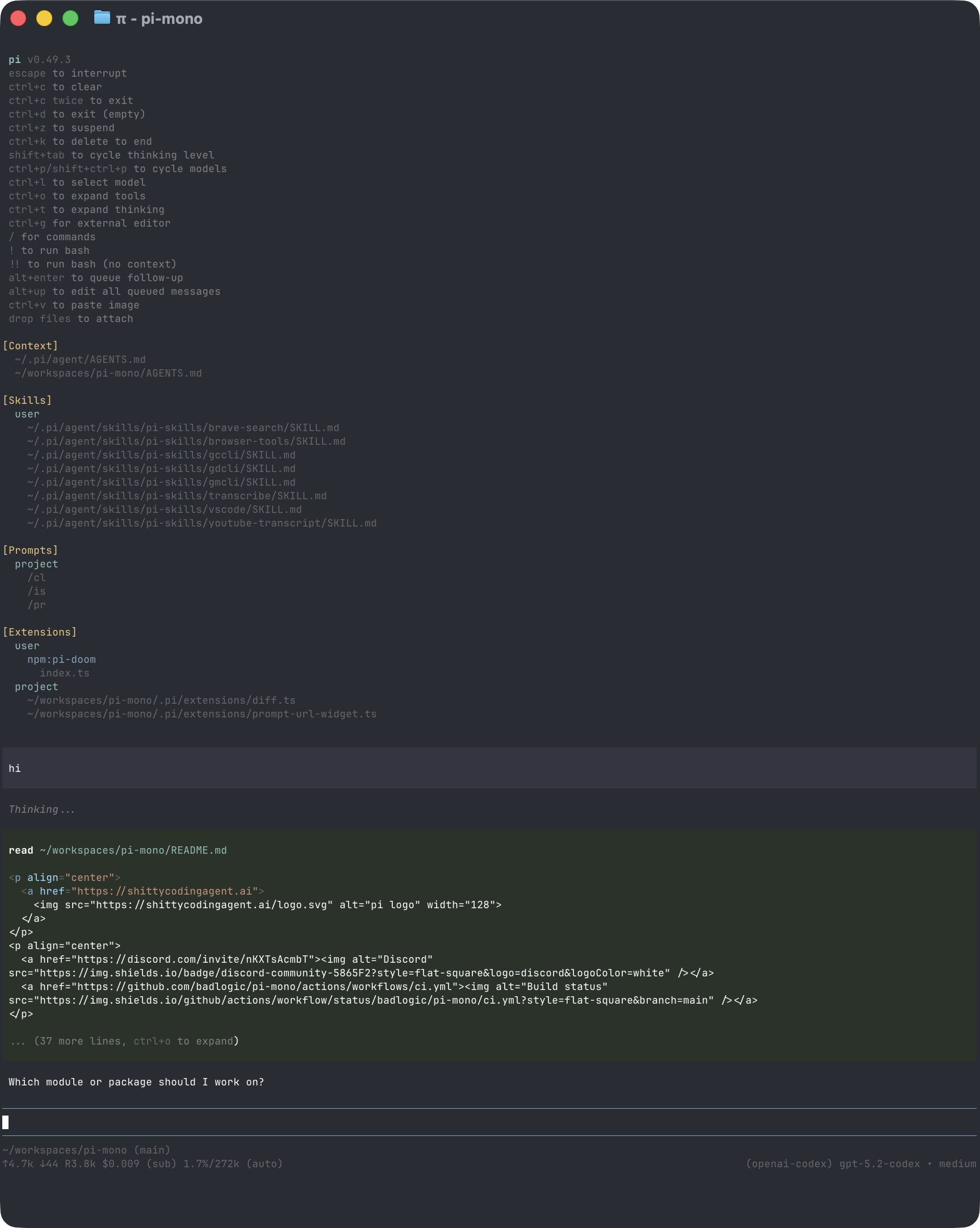
The interface from top to bottom:
- Startup header - Shows shortcuts (
/hotkeysfor all), loaded AGENTS.md files, prompt templates, skills, and extensions - Messages - Your messages, assistant responses, tool calls and results, notifications, errors, and extension UI
- Editor - Where you type; border color indicates thinking level
- Footer - Working directory, session name, total token/cache usage, cost, context usage, current model
The editor can be temporarily replaced by other UI, like built-in /settings or custom UI from extensions (e.g., a Q&A tool that lets the user answer model questions in a structured format). Extensions can also replace the editor, add widgets above/below it, a status line, custom footer, or overlays.
Editor
| Feature | How |
|---|---|
| File reference | Type @ to fuzzy-search project files |
| Path completion | Tab to complete paths |
| Multi-line | Shift+Enter (or Ctrl+Enter on Windows Terminal) |
| Images | Ctrl+V to paste (Alt+V on Windows), or drag onto terminal |
| Bash commands | !command runs and sends output to LLM, !!command runs without sending |
Standard editing keybindings for delete word, undo, etc. See docs/keybindings.md.
Commands
Type / in the editor to trigger commands. Extensions can register custom commands, skills are available as /skill:name, and prompt templates expand via /templatename.
| Command | Description |
|---|---|
/login, /logout |
OAuth authentication |
/model |
Switch models |
/scoped-models |
Enable/disable models for Ctrl+P cycling |
/settings |
Thinking level, theme, message delivery, transport |
/resume |
Pick from previous sessions |
/new |
Start a new session |
/name <name> |
Set session display name |
/session |
Show session info (path, tokens, cost) |
/tree |
Jump to any point in the session and continue from there |
/fork |
Create a new session from the current branch |
/compact [prompt] |
Manually compact context, optional custom instructions |
/copy |
Copy last assistant message to clipboard |
/export [file] |
Export session to HTML file |
/share |
Upload as private GitHub gist with shareable HTML link |
/reload |
Reload extensions, skills, prompts, context files (themes hot-reload automatically) |
/hotkeys |
Show all keyboard shortcuts |
/changelog |
Display version history |
/quit, /exit |
Quit companion |
Keyboard Shortcuts
See /hotkeys for the full list. Customize via ~/.companion/agent/keybindings.json. See docs/keybindings.md.
Commonly used:
| Key | Action |
|---|---|
| Ctrl+C | Clear editor |
| Ctrl+C twice | Quit |
| Escape | Cancel/abort |
| Escape twice | Open /tree |
| Ctrl+L | Open model selector |
| Ctrl+P / Shift+Ctrl+P | Cycle scoped models forward/backward |
| Shift+Tab | Cycle thinking level |
| Ctrl+O | Collapse/expand tool output |
| Ctrl+T | Collapse/expand thinking blocks |
Message Queue
Submit messages while the agent is working:
- Enter queues a steering message, delivered after current tool execution (interrupts remaining tools)
- Alt+Enter queues a follow-up message, delivered only after the agent finishes all work
- Escape aborts and restores queued messages to editor
- Alt+Up retrieves queued messages back to editor
Configure delivery in settings: steeringMode and followUpMode can be "one-at-a-time" (default, waits for response) or "all" (delivers all queued at once). transport selects provider transport preference ("sse", "websocket", or "auto") for providers that support multiple transports.
Sessions
Sessions are stored as JSONL files with a tree structure. Each entry has an id and parentId, enabling in-place branching without creating new files. See docs/session.md for file format.
Management
Sessions auto-save to ~/.companion/agent/sessions/ organized by working directory.
companion -c                  # Continue most recent session
companion -r                  # Browse and select from past sessions
companion --no-session        # Ephemeral mode (don't save)
companion --session <path>    # Use specific session file or ID
Branching
/tree - Navigate the session tree in-place. Select any previous point, continue from there, and switch between branches. All history preserved in a single file.
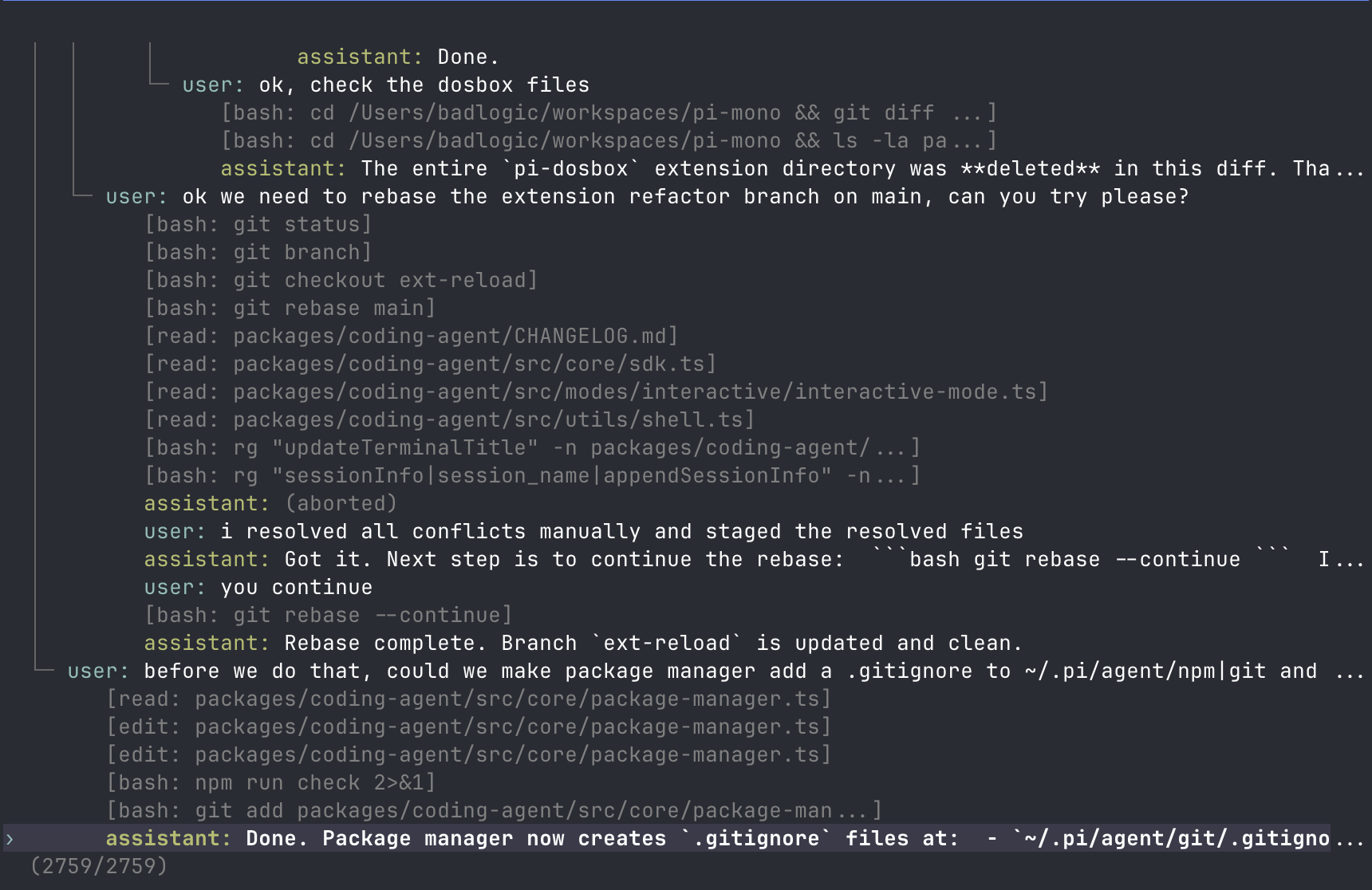
- Search by typing, page with ←/→
- Filter modes (Ctrl+O): default → no-tools → user-only → labeled-only → all
- Press
lto label entries as bookmarks
/fork - Create a new session file from the current branch. Opens a selector, copies history up to the selected point, and places that message in the editor for modification.
Compaction
Long sessions can exhaust context windows. Compaction summarizes older messages while keeping recent ones.
Manual: /compact or /compact <custom instructions>
Automatic: Enabled by default. Triggers on context overflow (recovers and retries) or when approaching the limit (proactive). Configure via /settings or settings.json.
Compaction is lossy. The full history remains in the JSONL file; use /tree to revisit. Customize compaction behavior via extensions. See docs/compaction.md for internals.
Settings
Use /settings to modify common options, or edit JSON files directly:
| Location | Scope |
|---|---|
~/.companion/agent/settings.json |
Global (all projects) |
.companion/settings.json |
Project (overrides global) |
See docs/settings.md for all options.
Context Files
Companion loads AGENTS.md (or CLAUDE.md) at startup from:
~/.companion/agent/AGENTS.md(global)- Parent directories (walking up from cwd)
- Current directory
Use for project instructions, conventions, common commands. All matching files are concatenated.
System Prompt
Replace the default system prompt with .companion/SYSTEM.md (project) or ~/.companion/agent/SYSTEM.md (global). Append without replacing via APPEND_SYSTEM.md.
Customization
Prompt Templates
Reusable prompts as Markdown files. Type /name to expand.
<!-- ~/.companion/agent/prompts/review.md -->

Review this code for bugs, security issues, and performance problems.
Focus on: {{focus}}
Place in ~/.companion/agent/prompts/, .companion/prompts/, or a companion package to share with others. See docs/prompt-templates.md.
Skills
On-demand capability packages following the Agent Skills standard. Invoke via /skill:name or let the agent load them automatically.
<!-- ~/.companion/agent/skills/my-skill/SKILL.md -->

# My Skill

Use this skill when the user asks about X.

## Steps

1. Do this
2. Then that
Place in ~/.companion/agent/skills/, ~/.agents/skills/, .companion/skills/, or .agents/skills/ (from cwd up through parent directories) or a companion package to share with others. See docs/skills.md.
Extensions
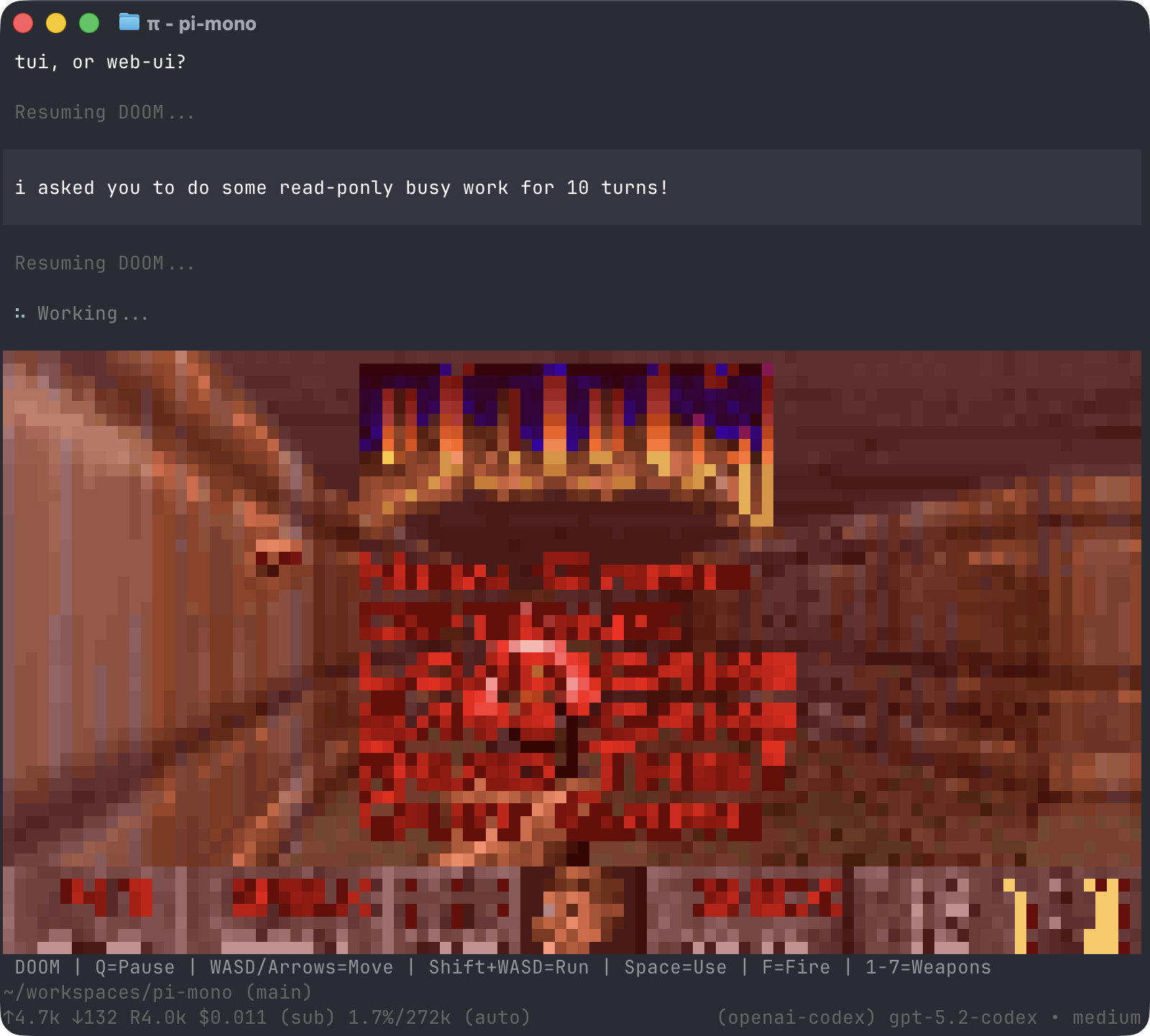
TypeScript modules that extend companion with custom tools, commands, keyboard shortcuts, event handlers, and UI components.
export default function (companion: ExtensionAPI) {
  companion.registerTool({ name: "deploy", ... });
  companion.registerCommand("stats", { ... });
  companion.on("tool_call", async (event, ctx) => { ... });
}
What's possible:
- Custom tools (or replace built-in tools entirely)
- Sub-agents and plan mode
- Custom compaction and summarization
- Permission gates and path protection
- Custom editors and UI components
- Status lines, headers, footers
- Git checkpointing and auto-commit
- SSH and sandbox execution
- MCP server integration
- Make companion look like Claude Code
- Games while waiting (yes, Doom runs)
- ...anything you can dream up
Place in ~/.companion/agent/extensions/, .companion/extensions/, or a companion package to share with others. See docs/extensions.md.
Themes
Built-in: dark, light. Themes hot-reload: modify the active theme file and companion immediately applies changes.
Place in ~/.companion/agent/themes/, .companion/themes/, or a companion package to share with others. See docs/themes.md.
Companion Packages
Bundle and share extensions, skills, prompts, and themes via npm or git. Find packages on npmjs.com or Discord.
Security: Companion packages run with full system access. Extensions execute arbitrary code, and skills can instruct the model to perform any action including running executables. Review source code before installing third-party packages.
companion install npm:@foo/companion-tools
companion install npm:@foo/companion-tools@1.2.3      # pinned version
companion install git:github.com/user/repo
companion install git:github.com/user/repo@v1  # tag or commit
companion install git:git@github.com:user/repo
companion install git:git@github.com:user/repo@v1  # tag or commit
companion install https://github.com/user/repo
companion install https://github.com/user/repo@v1      # tag or commit
companion install ssh://git@github.com/user/repo
companion install ssh://git@github.com/user/repo@v1    # tag or commit
companion remove npm:@foo/companion-tools
companion list
companion update                               # skips pinned packages
companion config                               # enable/disable extensions, skills, prompts, themes
Packages install to ~/.companion/agent/git/ (git) or global npm. Use -l for project-local installs (.companion/git/, .companion/npm/).
Create a package by adding a companion key to package.json:
{
  "name": "my-companion-package",
  "keywords": ["companion-package"],
  "companion": {
    "extensions": ["./extensions"],
    "skills": ["./skills"],
    "prompts": ["./prompts"],
    "themes": ["./themes"]
  }
}
Without a companion manifest, companion auto-discovers from conventional directories (extensions/, skills/, prompts/, themes/).
See docs/packages.md.
Programmatic Usage
SDK
import {
  AuthStorage,
  createAgentSession,
  ModelRegistry,
  SessionManager,
} from "@mariozechner/companion-coding-agent";

const { session } = await createAgentSession({
  sessionManager: SessionManager.inMemory(),
  authStorage: AuthStorage.create(),
  modelRegistry: new ModelRegistry(authStorage),
});

await session.prompt("What files are in the current directory?");
See docs/sdk.md.
RPC Mode
For non-Node.js integrations, use RPC mode over stdin/stdout:
companion --mode rpc
See docs/rpc.md for the protocol.
Philosophy
Companion is aggressively extensible so it doesn't have to dictate your workflow. Features that other tools bake in can be built with extensions, skills, or installed from third-party companion packages. This keeps the core minimal while letting you shape companion to fit how you work.
No MCP. Build CLI tools with READMEs (see Skills), or build an extension that adds MCP support. Why?
No sub-agents. There's many ways to do this. Spawn companion instances via tmux, or build your own with extensions, or install a package that does it your way.
No permission popups. Run in a container, or build your own confirmation flow with extensions inline with your environment and security requirements.
No plan mode. Write plans to files, or build it with extensions, or install a package.
No built-in to-dos. They confuse models. Use a TODO.md file, or build your own with extensions.
No background bash. Use tmux. Full observability, direct interaction.
Read the blog post for the full rationale.
CLI Reference
companion [options] [@files...] [messages...]
Package Commands
companion install <source> [-l]    # Install package, -l for project-local
companion remove <source> [-l]     # Remove package
companion update [source]          # Update packages (skips pinned)
companion list                     # List installed packages
companion config                   # Enable/disable package resources
Modes
| Flag | Description |
|---|---|
| (default) | Interactive mode |
-p, --print |
Print response and exit |
daemon |
Start a long-lived, non-interactive daemon that keeps extensions running |
--mode json |
Output all events as JSON lines (see docs/json.md) |
--mode rpc |
RPC mode for process integration (see docs/rpc.md) |
--export <in> [out] |
Export session to HTML |
Model Options
| Option | Description |
|---|---|
--provider <name> |
Provider (anthropic, openai, google, etc.) |
--model <pattern> |
Model pattern or ID (supports provider/id and optional :<thinking>) |
--api-key <key> |
API key (overrides env vars) |
--thinking <level> |
off, minimal, low, medium, high, xhigh |
--models <patterns> |
Comma-separated patterns for Ctrl+P cycling |
--list-models [search] |
List available models |
Session Options
| Option | Description |
|---|---|
-c, --continue |
Continue most recent session |
-r, --resume |
Browse and select session |
--session <path> |
Use specific session file or partial UUID |
--session-dir <dir> |
Custom session storage directory |
--no-session |
Ephemeral mode (don't save) |
Tool Options
| Option | Description |
|---|---|
--tools <list> |
Enable specific built-in tools (default: read,bash,edit,write) |
--no-tools |
Disable all built-in tools (extension tools still work) |
Available built-in tools: read, bash, edit, write, grep, find, ls
Resource Options
| Option | Description |
|---|---|
-e, --extension <source> |
Load extension from path, npm, or git (repeatable) |
--no-extensions |
Disable extension discovery |
--skill <path> |
Load skill (repeatable) |
--no-skills |
Disable skill discovery |
--prompt-template <path> |
Load prompt template (repeatable) |
--no-prompt-templates |
Disable prompt template discovery |
--theme <path> |
Load theme (repeatable) |
--no-themes |
Disable theme discovery |
Combine --no-* with explicit flags to load exactly what you need, ignoring settings.json (e.g., --no-extensions -e ./my-ext.ts).
Other Options
| Option | Description |
|---|---|
--system-prompt <text> |
Replace default prompt (context files and skills still appended) |
--append-system-prompt <text> |
Append to system prompt |
--verbose |
Force verbose startup |
-h, --help |
Show help |
-v, --version |
Show version |
File Arguments
Prefix files with @ to include in the message:
companion @prompt.md "Answer this"
companion -p @screenshot.png "What's in this image?"
companion @code.ts @test.ts "Review these files"
Examples
# Interactive with initial prompt
companion "List all .ts files in src/"

# Non-interactive
companion -p "Summarize this codebase"

# Different model
companion --provider openai --model gpt-4o "Help me refactor"

# Model with provider prefix (no --provider needed)
companion --model openai/gpt-4o "Help me refactor"

# Model with thinking level shorthand
companion --model sonnet:high "Solve this complex problem"

# Limit model cycling
companion --models "claude-*,gpt-4o"

# Read-only mode
companion --tools read,grep,find,ls -p "Review the code"

# High thinking level
companion --thinking high "Solve this complex problem"
Environment Variables
| Variable | Description |
|---|---|
COMPANION_CODING_AGENT_DIR |
Override config directory (default: ~/.companion/agent) |
COMPANION_PACKAGE_DIR |
Override package directory (useful for Nix/Guix where store paths tokenize poorly) |
COMPANION_SKIP_VERSION_CHECK |
Skip version check at startup |
COMPANION_CACHE_RETENTION |
Set to long for extended prompt cache (Anthropic: 1h, OpenAI: 24h) |
VISUAL, EDITOR |
External editor for Ctrl+G |
Contributing & Development
See CONTRIBUTING.md for guidelines and docs/development.md for setup, forking, and debugging.
License
MIT
See Also
- @mariozechner/companion-ai: Core LLM toolkit
- @mariozechner/companion-agent: Agent framework
- @mariozechner/companion-tui: Terminal UI components