
A server that runs inside your sandbox. Your app connects remotely to control Claude Code, Codex, OpenCode, Cursor, Amp, or Pi — streaming events, handling permissions, managing sessions.
Documentation — API Reference — Discord
Experimental: Gigacode — use OpenCode's TUI with any coding agent.
## Why Sandbox Agent? Running coding agents remotely is hard. Existing SDKs assume local execution, SSH breaks TTY handling and streaming, and every agent has a different API. Building from scratch means reimplementing everything for each coding agent. Sandbox Agent solves three problems: 1. **Coding agents need sandboxes** — You can't let AI execute arbitrary code on your production servers. Coding agents need isolated environments, but existing SDKs assume local execution. Sandbox Agent is a server that runs inside the sandbox and exposes HTTP/SSE. 2. **Every coding agent is different** — Claude Code, Codex, OpenCode, Cursor, Amp, and Pi each have proprietary APIs, event formats, and behaviors. Swapping agents means rewriting your integration. Sandbox Agent provides one HTTP API — write your code once, swap agents with a config change. 3. **Sessions are ephemeral** — Agent transcripts live in the sandbox. When the process ends, you lose everything. Sandbox Agent streams events in a universal schema to your storage. Persist to Postgres, ClickHouse, or [Rivet](https://rivet.dev). Replay later, audit everything. ## Features - **Universal Agent API**: Single interface to control Claude Code, Codex, OpenCode, Cursor, Amp, and Pi with full feature coverage - **Universal Session Schema**: Standardized schema that normalizes all agent event formats for storage and replay - **Runs Inside Any Sandbox**: Lightweight static Rust binary. One curl command to install inside E2B, Daytona, Vercel Sandboxes, or Docker - **Server or SDK Mode**: Run as an HTTP server or embed with the TypeScript SDK - **OpenAPI Spec**: [Well documented](https://sandboxagent.dev/docs/api-reference) and easy to integrate from any language - **OpenCode SDK & UI Support** *(Experimental)*: [Connect OpenCode CLI, SDK, or web UI](https://sandboxagent.dev/docs/opencode-compatibility) to control agents through familiar OpenCode tooling ## Architecture 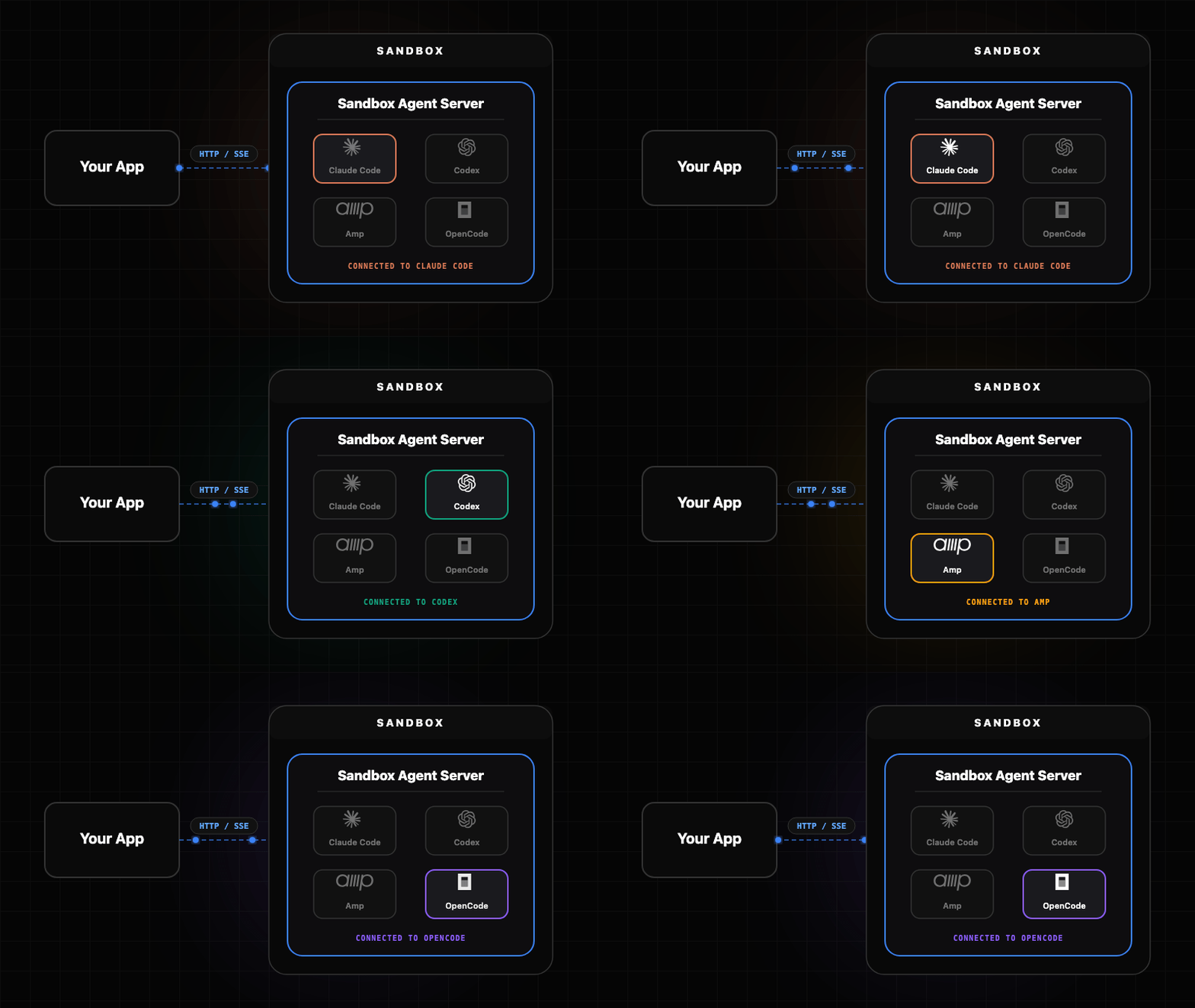 The Sandbox Agent acts as a universal adapter between your client application and various coding agents. Each agent has its own adapter that handles the translation between the universal API and the agent-specific interface. - **Embedded Mode**: Runs agents locally as subprocesses - **Server Mode**: Runs as HTTP server from any sandbox provider [Architecture documentation](https://sandboxagent.dev/docs) ## Components | Component | Description | |-----------|-------------| | **Server** | Rust daemon (`sandbox-agent server`) exposing the HTTP + SSE API | | **SDK** | TypeScript client with embedded and server modes | | **Inspector** | Built-in UI at inspecting sessions and events | | **CLI** | `sandbox-agent` (same binary, plus npm wrapper) mirrors the HTTP endpoints | ## Get Started Choose the installation method that works best for your use case. ### Skill Install skill with: ```bash npx skills add rivet-dev/skills -s sandbox-agent ``` ```bash bunx skills add rivet-dev/skills -s sandbox-agent ``` ### TypeScript SDK Import the SDK directly into your Node or browser application. Full type safety and streaming support. **Install** ```bash npm install sandbox-agent@0.3.x ``` ```bash bun add sandbox-agent@0.3.x # Optional: allow Bun to run postinstall scripts for native binaries (required for SandboxAgent.start()). bun pm trust @sandbox-agent/cli-linux-x64 @sandbox-agent/cli-linux-arm64 @sandbox-agent/cli-darwin-arm64 @sandbox-agent/cli-darwin-x64 @sandbox-agent/cli-win32-x64 ``` **Setup** Local (embedded mode): ```ts import { SandboxAgent } from "sandbox-agent"; const client = await SandboxAgent.start(); ``` Remote (server mode): ```ts import { SandboxAgent } from "sandbox-agent"; const client = await SandboxAgent.connect({ baseUrl: "http://127.0.0.1:2468", token: process.env.SANDBOX_TOKEN, }); ``` **API Overview** ```ts const agents = await client.listAgents(); await client.createSession("demo", { agent: "codex", agentMode: "default", }); await client.postMessage("demo", { message: "Hello from the SDK." }); for await (const event of client.streamEvents("demo", { offset: 0 })) { console.log(event.type, event.data); } ``` [SDK documentation](https://sandboxagent.dev/docs/sdks/typescript) — [Managing Sessions](https://sandboxagent.dev/docs/manage-sessions) ### HTTP Server Run as an HTTP server and connect from any language. Deploy to E2B, Daytona, Vercel, or your own infrastructure. ```bash # Install it curl -fsSL https://releases.rivet.dev/sandbox-agent/0.3.x/install.sh | sh # Run it sandbox-agent server --token "$SANDBOX_TOKEN" --host 127.0.0.1 --port 2468 ``` Optional: preinstall agent binaries (no server required; they will be installed lazily on first use if you skip this): ```bash sandbox-agent install-agent claude sandbox-agent install-agent codex sandbox-agent install-agent opencode sandbox-agent install-agent amp ``` To disable auth locally: ```bash sandbox-agent server --no-token --host 127.0.0.1 --port 2468 ``` [Quickstart](https://sandboxagent.dev/docs/quickstart) — [Deployment guides](https://sandboxagent.dev/docs/deploy) ### CLI Install the CLI wrapper (optional but convenient): ```bash npm install -g @sandbox-agent/cli@0.3.x ``` ```bash # Allow Bun to run postinstall scripts for native binaries. bun add -g @sandbox-agent/cli@0.3.x bun pm -g trust @sandbox-agent/cli-linux-x64 @sandbox-agent/cli-linux-arm64 @sandbox-agent/cli-darwin-arm64 @sandbox-agent/cli-darwin-x64 @sandbox-agent/cli-win32-x64 ``` Create a session and send a message: ```bash sandbox-agent api sessions create my-session --agent codex --endpoint http://127.0.0.1:2468 --token "$SANDBOX_TOKEN" sandbox-agent api sessions send-message my-session --message "Hello" --endpoint http://127.0.0.1:2468 --token "$SANDBOX_TOKEN" sandbox-agent api sessions send-message-stream my-session --message "Hello" --endpoint http://127.0.0.1:2468 --token "$SANDBOX_TOKEN" ``` You can also use npx like: ```bash npx @sandbox-agent/cli@0.3.x --help ``` ```bash bunx @sandbox-agent/cli@0.3.x --help ``` [CLI documentation](https://sandboxagent.dev/docs/cli) ### Inspector Debug sessions and events with the built-in Inspector UI (e.g., `http://localhost:2468/ui/`).  [Inspector documentation](https://sandboxagent.dev/docs/inspector) ### OpenAPI Specification [Explore API](https://sandboxagent.dev/docs/api-reference) — [View Specification](https://github.com/rivet-dev/sandbox-agent/blob/main/docs/openapi.json) ### Tip: Extract credentials Often you need to use your personal API tokens to test agents on sandboxes: ```bash sandbox-agent credentials extract-env --export ``` This prints environment variables for your OpenAI/Anthropic/etc API keys to test with Sandbox Agent SDK. ## FAQ